How to Program Universal Garage Door Opener on a 2026 Chevy Traverse
Did you know you can program your 2026 Chevy Traverse to operate your garage door without needing to keep a separate garage door remote handy?
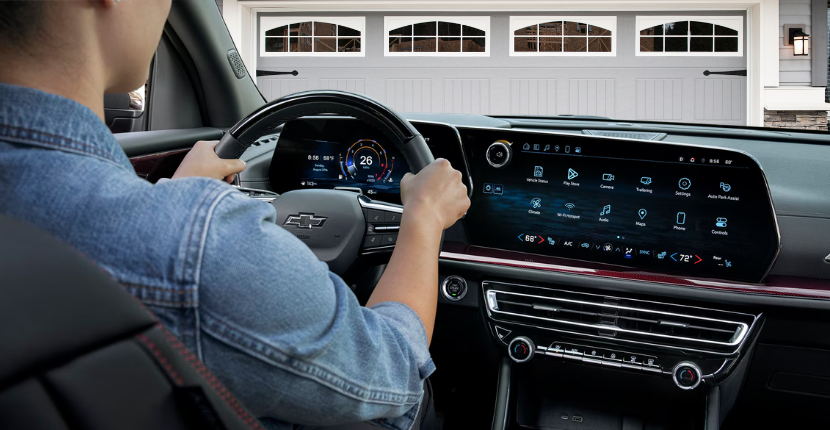
The Universal Garage Door Opener System in the 2026 Chevy Traverse allows you to program a compatible garage door opener and access it directly through the vehicle’s center display.
If you’re wondering how to program the garage door opener in a 2026 Chevy Traverse, follow the steps below from the team at Apple Chevrolet in Tinley Park, IL.
Watch: How to Program the Garage Door Opener in a 2026 Chevy Traverse
Want to see the process in action? Watch our video below for a step-by-step demonstration of how to program the Universal Garage Door Opener in a 2026 Chevrolet Traverse.
How Do You Program the Garage Door Opener on a 2026 Chevy Traverse?
Before getting started, park your Traverse outside and directly facing your garage door opener receiver. Make sure the area around the garage door is clear and keep the vehicle in Park throughout the programming process.
If your garage door opener has a handheld remote, have it with you in the vehicle. Chevrolet recommends making sure the remote has a good battery to provide a strong signal.
Then follow these steps:
- On the center display, open Controls.
- Select Universal Remotes. You may need to select See More Controls to find it.
- Select Add Remote.
- Select Yes when asked if your garage door opener has a handheld transmitter.
- Hold your garage door remote approximately 1 to 3 inches from the rearview mirror.
- Press and hold the button on your handheld garage door remote while the Traverse searches for its signal.
- Continue holding the button until Signal Found appears on the center display.
- Select Test on the screen to test the newly programmed remote. You may need to select Test more than once.
- If the garage door moves, select It Worked to finish programming.
That’s it! Your garage door remote can now be accessed through your Traverse’s center display.
What If My Chevy Traverse Garage Door Opener Doesn’t Work After Programming?
If the garage door doesn’t move when you select Test, don’t worry. Some garage door openers require an additional programming step.
Select It Didn’t Work on the Traverse display and follow the prompts.
You may need to locate the Learn or Smart button on your garage door opener receiver. This button is generally found near the antenna wire on the garage door opener unit.
After pressing the Learn or Smart button, return directly to your Traverse and select Test again. Because this process can be time-sensitive, having another person assist you may make programming easier.
Where Is the Garage Door Opener in a 2026 Chevy Traverse?
Unlike garage door opener systems that rely solely on physical buttons, the 2026 Chevy Traverse Universal Remote System can be accessed through the vehicle’s Controls menu.
From the center display, go to:
Controls > Universal Remotes
Depending on your vehicle’s equipment and display configuration, you may need to select See More Controls to find Universal Remotes.
Does the 2026 Chevy Traverse Have HomeLink?
The 2026 Chevy Traverse uses Chevrolet’s Universal Remote System, which allows compatible garage door openers and certain other devices to be programmed through the vehicle.
Rather than assuming compatibility based on the HomeLink name alone, check your specific vehicle’s equipment and garage door opener compatibility. Chevrolet notes that the Universal Remote System works with many garage door openers and certain security systems and home devices.
How Do I Open My Garage Door After Programming My Chevy Traverse?
Once you’ve successfully programmed your garage door opener, the remote appears on your center display. Simply select the remote icon when you want to operate the garage door.
The Traverse can also save the location where the remote was programmed. When you return to that location, the garage door remote can automatically appear in the display’s App tray for convenient access.
You can also use the pencil icon to rename your programmed remote or update its saved location.
How Many Garage Door Remotes Can I Program?
Chevrolet’s Universal Remote System supports up to eight universal remotes in the center display or Front Command Center, if equipped.
That means you may be able to program multiple compatible garage doors, gates or other supported devices instead of carrying several individual remotes. Visit our Tinley Park Chevy dealership to learn more!
Frequently Asked Questions About the 2026 Chevy Traverse Garage Door Opener
Where do I program my garage door opener in a 2026 Chevy Traverse?
Open Controls on the center display and select Universal Remotes > Add Remote. Depending on your display, you may need to select See More Controls first.
How close should my garage door remote be when programming it?
Chevrolet instructs you to hold the handheld transmitter approximately 1 to 3 inches from the rearview mirror while programming.
Why won’t my Chevy Traverse connect to my garage door opener?
Some garage door openers require you to press the Learn or Smart button on the garage door opener receiver before completing programming in your Traverse. You should also make sure the battery in your handheld garage door remote is strong.
Can I program more than one garage door opener?
Yes. Chevrolet’s Universal Remote System can store up to eight universal remotes, depending on vehicle equipment.
Will my garage door button automatically appear when I get home?
The system can save the location where the Universal Remote was programmed. When you return to the saved location, the remote can appear in the App tray on your center display for easier access.
Can I rename my garage door remote?
Yes. After programming a Universal Remote, select the pencil icon to rename it. You can also use this menu to update its saved location.
Learn More About Your 2026 Chevy Traverse at Apple Chevrolet
The 2026 Chevy Traverse includes technology designed to make everyday driving more convenient, and learning how to use features like the Universal Garage Door Opener can help you get even more out of your SUV.
If you’re looking for a 2026 Chevy Traverse in Tinley Park, searching for a Tinley Park Chevy dealership, or comparing Chevy dealers near me, visit Apple Chevrolet in Tinley Park, IL to explore our Chevy inventory and get help understanding the technology and features in your vehicle.
Check back for more Chevy how-to videos, vehicle feature guides, and ownership tips from the team at Apple Chevrolet.